
Raspberry Pi Pico - RP2040 - Cortex-M0+ - MicroUSB with header pins
Product information:
At the heart of the Raspberry Pi Pico microcontroller board is a custom Raspberry Pi-designed chip called the RP2040 featuring a 133MHz clocked ARM Cortex-M0+ dual-core with integrated 2MB QSPI flash memory for code and data storage.
You can program your Pico by simply connecting it to a computer/notebook via USB and then transferring a previously downloaded UF2 file, which makes installing MicroPython easier.
You can get detailed information and the file at https://pico.raspberrypi.org/getting-started/.
Micropython is a complete implementation of the Python 3 programming language, you get an interactive prompt (REPL) to execute commands directly via USB Serial and an integrated file system.
Technical data:
• RP2040 microcontroller
bulletpoint# 2 MB QSPI flash memory
bulletpoint# 256 KB RAM
• 2x 20 I/O pin header (26x 3.3V GPIO pins)
• ADC 12-bit 500 ksps
• 2x UART / 2x I2C / 2x SPI / 16x PWM
• RTC / Timer with 4 alarms
• Pen spacing: 2.54 mm
• 3-pin ARM Serial Wire Debug (SWD) connector
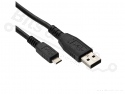
• Micro USB 1.1 for power and data transfer
• dimensions (LxWxH): 51.3 x 21 x 3.9 mm
Programming language:
• MicroPython
• C/C++
More information can be found under datasheets and at:
https://pico.raspberrypi.org/getting-started/
https://github.com/micropython/micropython/wiki
https://forum.micropython.org/
https://pico.raspberrypi.org/sdk/index.html






 >
>



 Shipping costs Netherlands